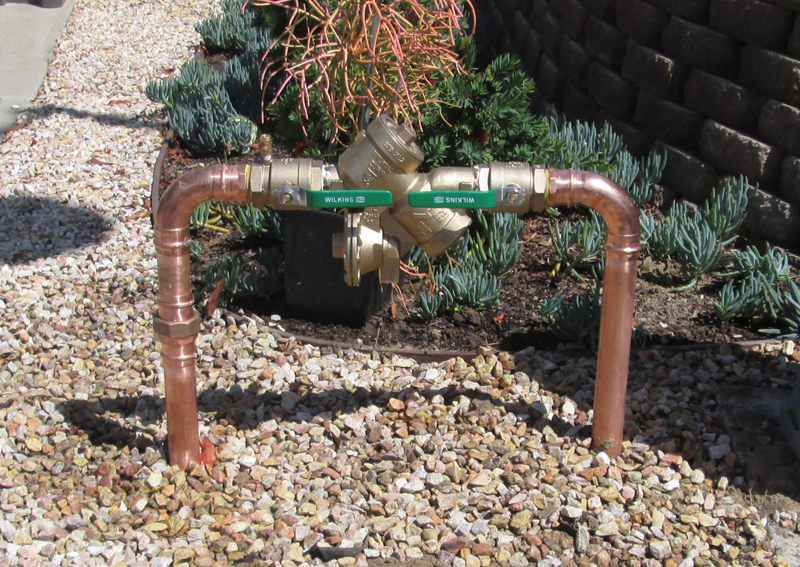



Making sure your backflow data matches city requirements is important to keep your water supply safe and avoid fines. The easiest way? Have your backflow preventer tested every year by certified professionals who file reports straight to your local authorities. That way, you stay compliant without having to chase down regulations yourself.
Start by checking any notices from your local water district or just call your water provider to see what records they expect. If you work with a company like Pacific Backflow (they cover all of San Diego County), your tests and paperwork get handled quickly and correctly.
Once you know what your city wants, you’ll actually feel confident your backflow system is doing its job and you’re meeting all the rules. Let’s walk through the process and share a few tips to keep everything current.
Understanding City Backflow Data Requirements
You’ve got to keep your backflow compliance data clear, accurate, and in the right format. That’s how you avoid delays or fines. If you know what details to include and how to present them, you’ll sidestep most headaches.
Key Elements of City Backflow Compliance
Backflow data needs to cover certain details to meet city rules:
- Where the backflow preventer is located
- Date of the test
- Tester’s certification or license info
- Test results (pass/fail)
- Any repairs or replacements
Cities want accurate and complete information so they know your backflow device works and protects the water supply. Usually, you have to submit reports every year. If info is missing or wrong, you’ll probably run into compliance issues.
Pacific Backflow’s certified techs make sure all this is included when they test and submit your reports. Keeping your data organized helps city officials verify your system without a hassle.
Common Data Formats Required by Municipalities
City water departments often want backflow compliance data in both digital and paper forms. Digital files should be secure and easy to access, like PDFs or entries in an online portal.
- Use secure cloud storage or encrypted files for digital data
- Keep physical copies in a labeled folder just in case
Lots of cities have their own forms or software for filing reports. Your tester (like Pacific Backflow) can handle this, so you don’t have to stress about it.
If you follow the city’s format, your data is way more likely to get accepted on the first try. Less back and forth, less stress.
Consequences of Non-Compliance
If your backflow data doesn’t meet city requirements, it can get expensive. You might face:
- Fines for late or missing reports
- Water shutoff until you’re compliant
- Extra inspection or repair costs
Incomplete or sloppy data can slow down acceptance and might even risk your water safety. Cities take contamination seriously—nobody wants that.
Stay on top of testing and reporting, and you’ll steer clear of these headaches.
Preparing Your Backflow Data
Getting your backflow data ready means collecting test results carefully and keeping your records tidy. You’ll want accurate info from your tests and a reliable way to store it. That way, you’re ready when the city asks.
Gathering Backflow Test Results
First, pull together all your recent backflow test reports. Certified testers (like Pacific Backflow) will do a thorough inspection and give you the results. Make sure each report lists:
- Date of the test
- Tester’s certification details
- Test results, including any issues
- Device info: make, model, location
Track any repairs or replacements after a test—they can affect your compliance. Keep digital copies (PDFs work great) and paper versions if you can. Having these ready makes city submissions way smoother.
Ensuring Accurate Record Keeping
Once you’ve got your test results, organize them. Use folders labeled by year, device, or address—whatever makes sense to you. Store them on your computer and in secure cloud storage to protect against loss.
Double-check your documents before submitting. Make sure the tester’s license number and test dates are right. One mistake can mean the city rejects your report.
If you hire outside testers, check if they’ll file reports directly with the city. If not, you’ll need to do it. Keep a log of every report you submit, including confirmation numbers or emails from your water agency. That way, you always know where you stand.
Comparing Your Data with City Standards
To confirm your backflow data matches city requirements, you’ll need to check the city’s instructions and your own records. Look at how to submit, what info needs to be included, and scan for errors or missing parts before sending anything in.
Reviewing City Submission Guidelines
Carefully read your city’s submission rules. Most cities give you a deadline—often 30 days after testing. They’ll probably specify a format (online upload, email, or paper).
Some cities only accept reports from certified testers or licensed plumbers, so make sure your reports come from the right people. Find out if they want originals or if copies are okay. Knowing these details speeds up approval and keeps you out of trouble.
Keep a copy of the guidelines close by. Cities sometimes change the rules, so it’s worth checking before each test.
Cross-Checking Required Fields
Your report should have everything the city asks for, like:
- Property owner’s name and address
- Backflow device location
- Test date
- Tester’s name and certification number
- Test results
- Repairs (if any)
Make a checklist and compare it to your report. Missing or inconsistent data can delay approval or even lead to fines. If the tester’s certification number is missing, for example, the city might just reject the report. Double-check your backflow device’s model and serial number, too. It’s worth the extra minute.
Identifying Missing or Inaccurate Information
Before you submit, look for gaps or mistakes. Common slip-ups: wrong address, incomplete tester info, or missing test results. Even a small typo can mess up compliance.
If you notice missing data, reach out to the testing company right away. Double-check names, numbers, and dates with the paperwork.
Keep both digital and printed copies of your reports. If the city ever asks for proof, you’ll have it. Pacific Backflow can help make sure your testing and filing are done right, so you’re not left guessing.
Submitting and Verifying Data Accuracy
Submitting your backflow test data to the city is crucial for compliance. You’ve got to send in the report, check that the city accepts it, and fix any mistakes fast to avoid penalties.
Submitting Backflow Data to the City
After your backflow test, the certified tester or company should send results to your local water authority. Most cities take submissions online or by email. Make sure your info includes:
- Test date
- Location and device details
- Tester’s certification info
- Test results and repairs
Keep a copy for yourself. Some testers, like Pacific Backflow, will file these for you—less hassle. Before you submit, double-check that everything matches city requirements. If something’s missing or wrong, you could face delays.
Receiving and Interpreting Feedback
Once you send your report, the city reviews it—sometimes within days, sometimes weeks. They’ll either confirm acceptance or ask for more info. Watch for:
- Compliance confirmations
- Requests for clarification or missing details
- Error or rejection notices
Read any messages closely. If they flag a problem, they’ll usually tell you what needs fixing. Staying organized helps you respond quickly and keeps your water supply safe.
Correcting Submission Errors
If your report gets rejected or flagged as incomplete, fix it right away. Common mistakes: missing signatures, wrong dates, incomplete details. Here’s what to do:
- Read the city’s feedback
- Update your report with the correct info
- Resubmit online or by mail, as instructed
Ask your tester or service provider for help if you’re stuck. Pacific Backflow, for instance, helps customers correct and resubmit reports to stay compliant. Sorting out errors quickly protects your property and the community’s water.
Maintaining Compliance for Future Inspections
Keeping your backflow compliance data accurate and updated makes future inspections much less stressful. You’ll want to regularly review your data and update records whenever there are changes to your system or equipment.
Implementing Ongoing Data Review Processes
Set a reminder to review your backflow data every few months or after each test. This way, you’ll catch errors early. Use a checklist to compare your records to city requirements—test dates, device types, serial numbers, tester details.
Store your data both digitally and on paper. Use secure cloud storage or encrypted files for digital copies. For paper records, pick a spot that’s safe but easy to access. That way, you’re always ready to show proof if an inspector asks.
If you’re unsure, ask a certified tester like Pacific Backflow to review your reports. They know the local rules and can spot issues before the city does. Staying on top of this keeps your system compliant and your water safe.
Updating Records After System Changes
If you replace or repair a backflow device, update your records right away. Add the date, details of the new or repaired device, and who did the work. This keeps your compliance data ready for inspection.
If you change your system’s layout—add pipes, fixtures, whatever—note it in your records. The city might want new testing to reflect the changes. Keep repair bills, installation certificates, and test reports together.
Notify your local water authority when required. Some cities want updated reports within a certain time after changes. Miss a deadline, and you could face fines or service interruptions.
Keeping your records current helps avoid surprises and makes annual checks much simpler.
Frequently Asked Questions
Knowing how to keep your backflow system up to code and submitting test results properly is crucial to avoiding fines. Different cities may require specific devices, and testing deadlines can vary. If you understand these details, you’re much more likely to stay compliant and protect your water supply.
What steps should I take to ensure my backflow system is up to code?
Start by scheduling annual testing with certified technicians. Check that your backflow preventer works and meets local standards. Fix or replace anything that fails inspection right away. Keep clear records of tests and repairs.
Can you guide me through the process of submitting backflow test results to the city?
Usually, after testing, the certified tester fills out the required forms and submits them to your water authority. Pacific Backflow, for example, files these reports for you in San Diego County, so everything stays timely and accurate. Always keep a copy for your own records.
Which specific backflow prevention devices are mandated by most municipalities?
Most cities ask for devices like double check valves or reduced pressure zone assemblies. The choice really comes down to your property’s risk level and local rules. Honestly, your tester is probably the best person to help you pick the right device for your situation.
How can I find out about my city's specific backflow prevention requirements?
You’ll want to check your city or water district’s official website, or just give your local water authority a call. They usually list testing schedules, approved devices, and how to file paperwork. Certified testers like Pacific Backflow can also point you in the right direction if you’re feeling a bit lost.
What are the consequences of not complying with city backflow regulations?
If you skip testing or repairs, you might get hit with fines or even legal issues. There’s also the risk of contaminating the public water supply—which, let’s be honest, nobody wants. Staying on top of compliance isn’t just about avoiding penalties; it’s about keeping everyone’s water safe.
How often do cities typically require backflow preventer testing?
Usually, cities ask for backflow preventer testing once a year, whether it’s for homes or businesses. In some places, though, you might run into tighter rules—maybe because of higher risk or just the kind of device you’ve got. Honestly, it’s safest to just put it on your calendar every year so you don’t get caught off guard.